
View details
View an single endpoint
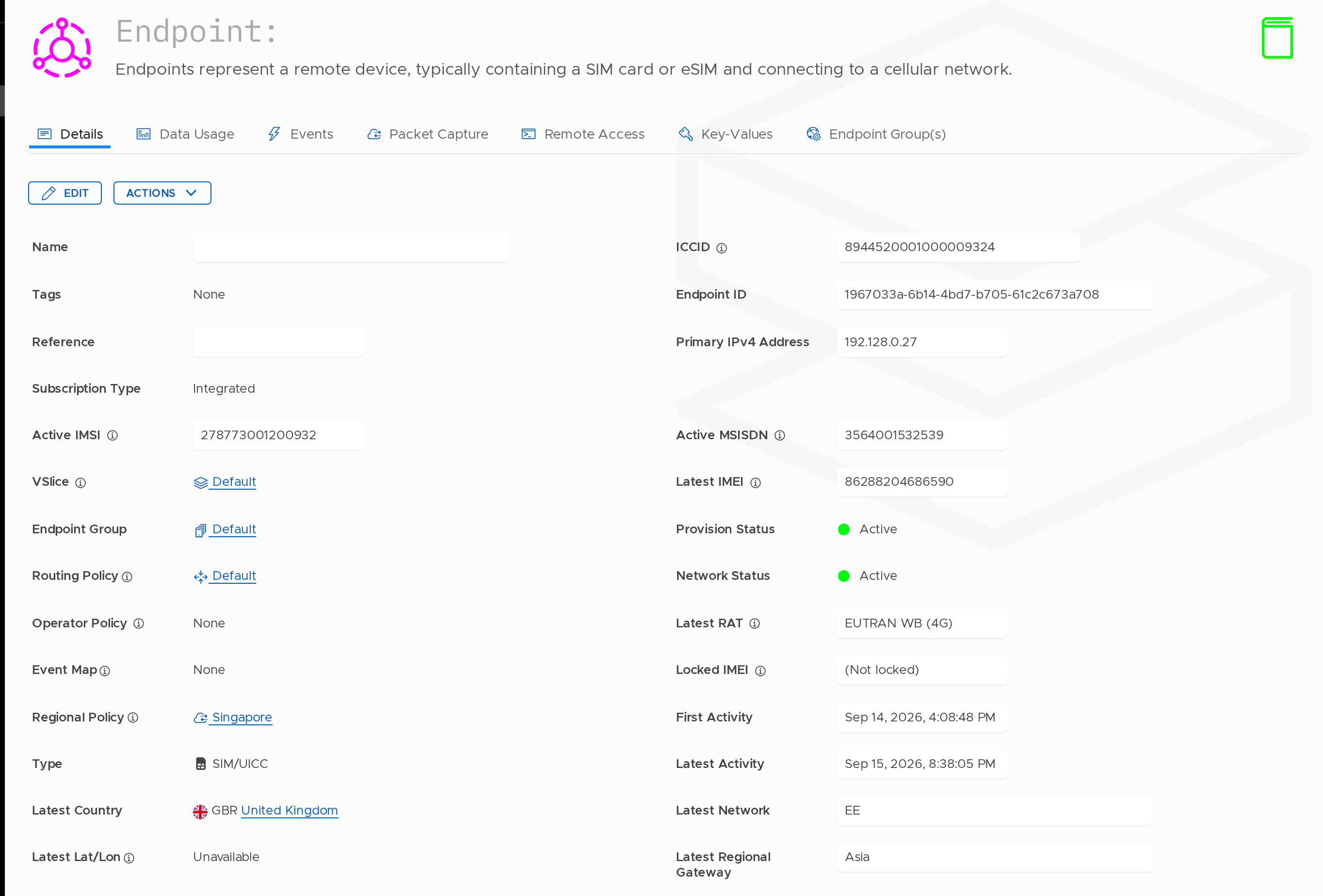
The Endpoint 'View details' section provides comprehensive information about a specific SIM or device provisioned on the Stacuity network. This is your central hub for understanding the current state and configuration of any endpoint.
Accessing Endpoint Details
To view endpoint details:
- From the main dashboard, click Inventory in the left navigation
- Select Endpoints
- Click the View button next to the endpoint you want to examine
Endpoint Fields Explained
The Endpoint Details page displays the following fields:
| Field | Description |
|---|---|
| ICCID | Integrated Circuit Card Identifier - the unique serial number of the SIM card. This is the primary identifier for the physical SIM and cannot be changed. |
| IMSI | International Mobile Subscriber Identity - the unique identifier associated with the mobile network subscription. An endpoint may have multiple IMSIs if it's configured for multi-IMSI roaming. |
| Name | A user-friendly name assigned to the endpoint for easy identification. This can be customised to reflect the device's purpose or location (e.g., "Truck 001" or "Warehouse Sensor A"). |
| Status | The current lifecycle state of the endpoint. This reflects both provisioning and network status (e.g. Active, Idle, Detached, Suspended, Terminated). |
| Endpoint Group | The Endpoint Group that this endpoint belongs to. The Endpoint Group determines the network configuration applied to this endpoint. |
| VSlice | The VSlice (Virtual Slice) that this endpoint is associated with. The VSlice defines the fundamental network characteristics including IP addressing and connectivity. |
| Routing Policy | Routing Policy inherited from the Endpoint Group. This controls how the endpoint’s traffic is routed through the Stacuity network to various Routing Targets. |
| Tags | User-defined labels that help categorise and search for endpoints. Tags can be used for grouping, filtering, or adding custom metadata (e.g., "fleet:logistics", "region:emea"). |
| Reference | An optional external reference field that can be used to link the endpoint to external systems such as CRM records, asset management systems, or ERP platforms. |
| Locked IMEI | The International Mobile Equipment Identity of the device that the SIM is locked to. When an endpoint has a locked IMEI, it can only connect using that specific device hardware. This provides an additional security layer to prevent SIM swapping. |
Additional Information
Multi-IMSI Endpoints
Some endpoints may display multiple IMSIs. This occurs when the endpoint is configured for multi-IMSI roaming. IMSI selection is handled by external orchestration systems. The primary IMSI is displayed first, followed by any secondary IMSIs.
Status Indicators
The status field provides at-a-glance information about endpoint connectivity:
- Green indicator - Endpoint is active and currently connected
- Yellow indicator - Endpoint is active but not currently connected
- Red indicator - Endpoint is suspended or has an error condition
Colour indicators provide a quick visual summary of status; refer to the lifecycle state for precise behaviour.
Managing Endpoint Details
From this view, you can also:
- Edit Endpoint - Modify the endpoint name, tags, and other configurable properties
- View Data Usage - Monitor data consumption
- View Events - Review event history
- View IP Addresses - See assigned IP addresses
- View Key Values - Access custom metadata
- View Signalling Traces - Analyse network signalling
Updated about 1 month ago