
Creating and Managing Bundle
Understanding Bundle Architecture
Bundle Definitions vs Instances
When you create a bundle in the Stacuity platform, you're actually creating what we call a "master bundle" - think of it as a template or blueprint. Each time you apply that bundle to an endpoint, the system creates a "bundle instance" which is essentially a copy of your original template. This is brilliant because it means you can create one master bundle (say, a 15GB monthly bundle) and apply it to multiple endpoints without having to recreate it every time.
Starting the Bundle Creation Process
- Navigate to Charging → Bundles
- Click Actions → Create master bundle
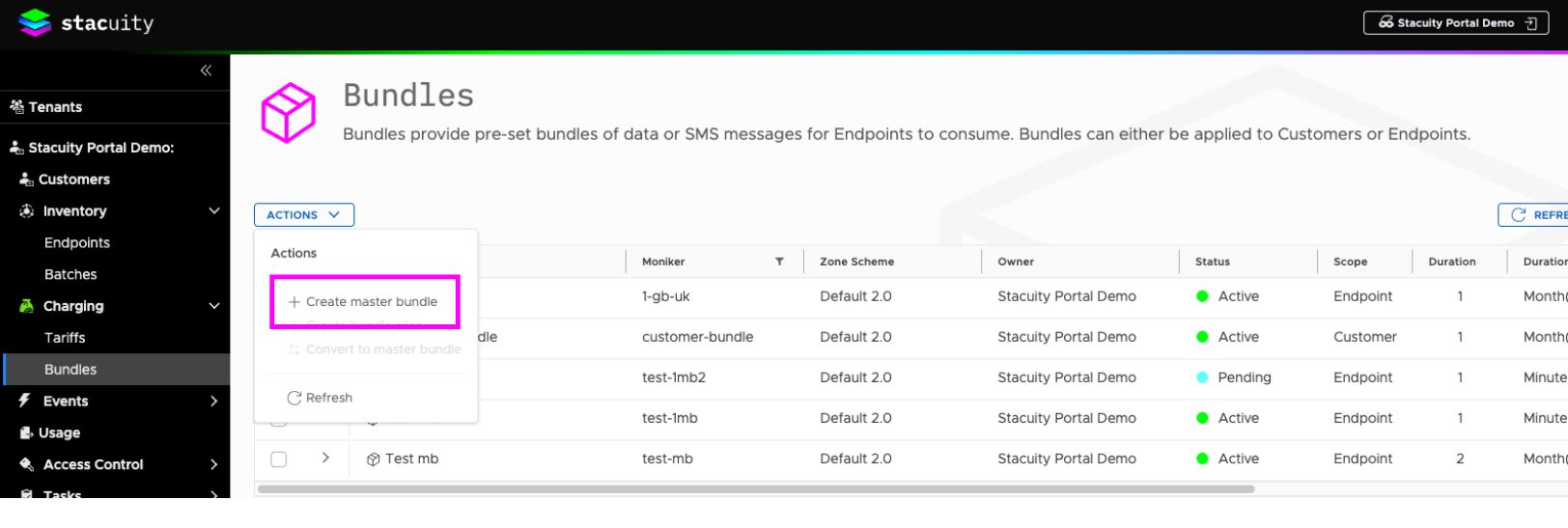
-
Define you bundle structure
Field Description Zone Scheme Defines the geographic and network structure for coverage. The default zone scheme is Default 2.0. Name A human-readable name for the bundle. Moniker A unique identifier for the bundle alias. Status Indicates the current state of the bundle. See status values below. Scope Determines where the bundle can be assigned. See scope options below. Duration Defines how long each bundle instance remains valid (e.g., 1 month). Iterations Specifies how many consecutive periods the bundle covers. Perpetual Allows continuous automatic renewal of bundles until manually stopped. When Perpetual is enabled, the Iterations setting is no longer applicable and is therefore ignored. Reservation Size Defines the amount of data that can be consumed before the network requests additional credit authorisation. Once the reserved amount is used, the PGW requests a new reservation from the charging system. Smaller reservation sizes provide tighter credit control, while larger sizes reduce signalling overhead. Reservation Duration Defines the maximum time a reservation remains valid before the network requests additional credit authorisation. If the reservation period expires, the PGW requests a new reservation regardless of data usage. Shorter durations provide more frequent balance validation, while longer durations reduce signalling and are often more suitable for low-usage or IoT deployments. Status ValuesStatus Description Pending The bundle is still being created and cannot yet be assigned to an endpoint. Active The bundle is available and can be assigned to endpoints. Suspended The bundle can no longer be assigned to any endpoints. Scope OptionsScope Description Customer A Customer-level bundle is a shared pool of data available to every endpoint under the customer account. Endpoint Group An Endpoint Group-level bundle is a shared pool of data available to every endpoint within a specific endpoint group. Endpoints outside that group do not draw from it.
For details on creating and managing endpoint groups, see Endpoint Groups.
Endpoint An Endpoint-level bundle is assigned per endpoint and consumed by that endpoint alone, so each endpoint gets its own allocation rather than drawing from a shared pool.
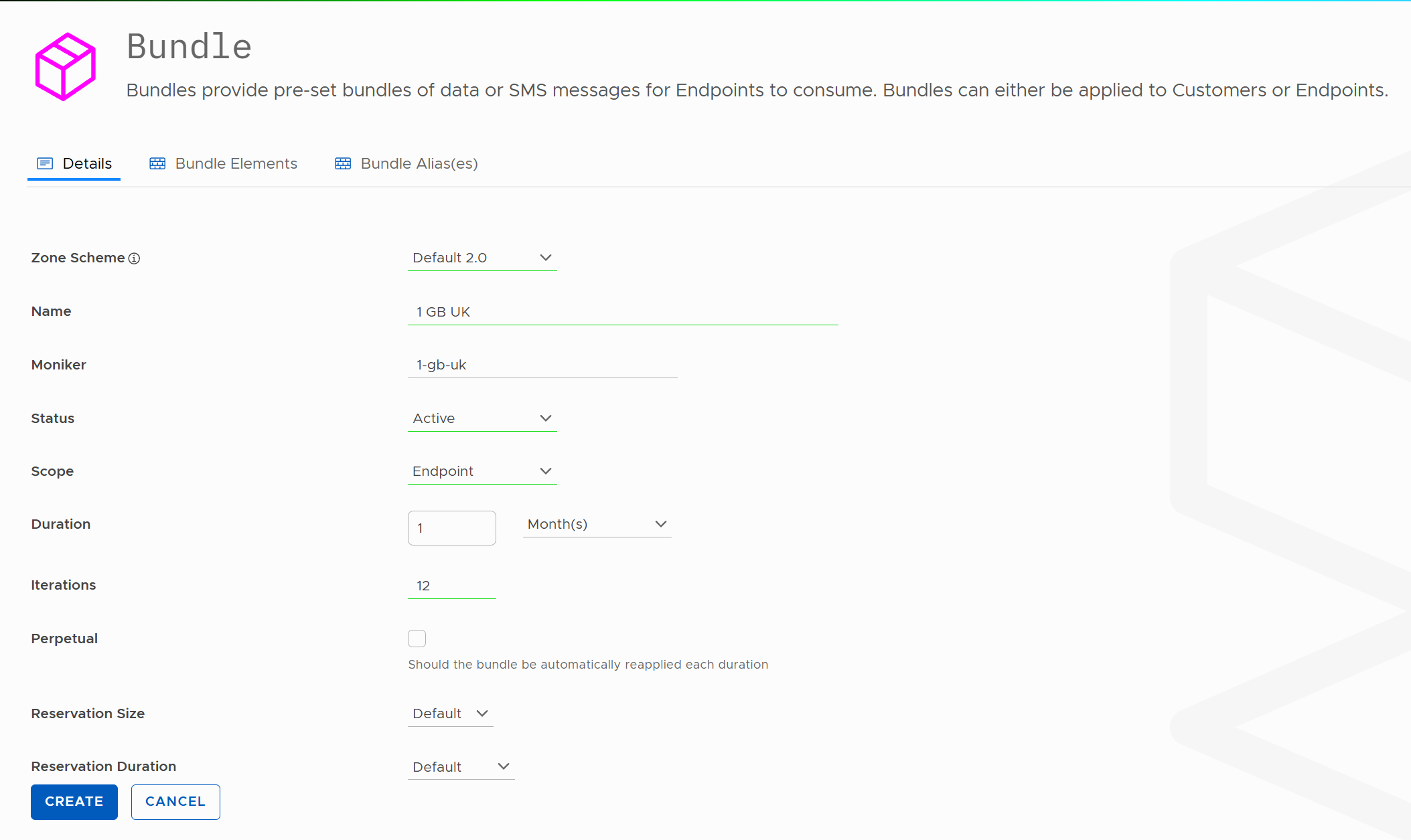
When you first create a bundle, you're essentially creating an empty container with basic settings like duration and scope. Think of it like creating a new data plan template - you've got the name and basic structure, but no actual data allocations yet. These data allocations are called elements.
Updated 2 months ago
What’s Next
Add Bundle Elements