
Introduction & Key Concepts
Getting Started: How the Stacuity Customer Portal Works
The Stacuity Customer Portal is the management interface for your connectivity estate. From here you control all customer-configurable aspects of your SIM deployment: which devices are active, where their traffic goes, which mobile networks they can use, and what happens when something changes on the network.
The portal is a customer view. It represents your account as provisioned by your tenant (your connectivity provider). Your tenant has already configured the upstream network parameters. The portal gives you operational control within that framework.
How Everything Fits Together
The platform is built around a hierarchy of objects. Understanding how they relate to each other makes every task in the portal straightforward.
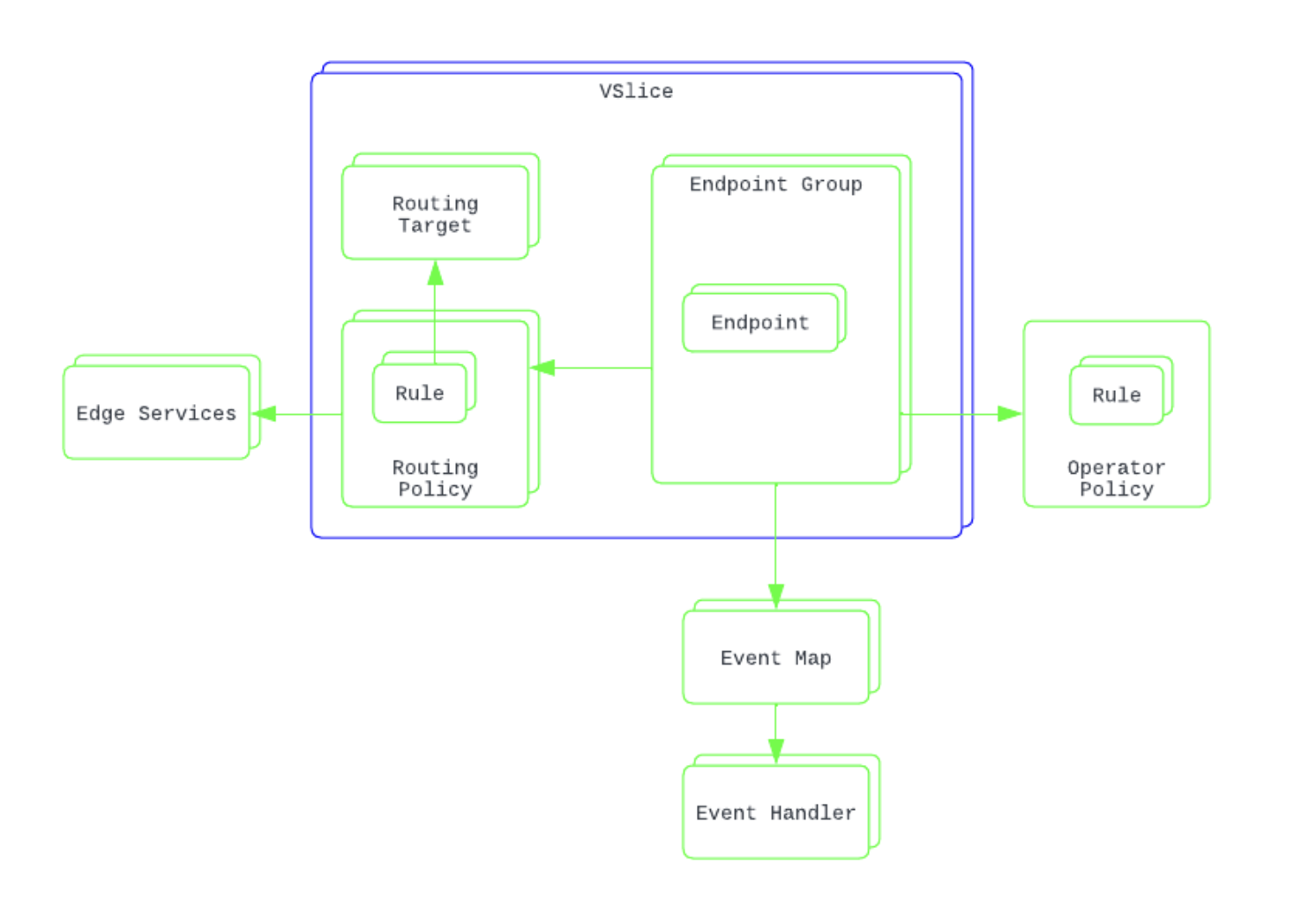
The diagram above shows the key relationships:
-
The VSlice is the outer boundary. The following are associated with a VSlice: Routing Targets, Routing Policies, and Endpoint Groups.
-
An Endpoint Group is configured with a Routing Policy, and can optionally be associated with an Operator Policy and an Event Map.
-
A Routing Policy contains Rules that reference Routing Targets and can connect to Edge Services.
-
Endpoints sit inside Endpoint Groups and inherit all configuration from the group.
-
Event Maps define where events are sent (for example, to a webhook) on a per-event-type basis.
They can be applied at different levels:
Global Event Maps: define how account-level events are handled
VSlice Event Maps: apply to all endpoints within a VSlice
Endpoint Group Event Maps: apply to endpoints within a specific groupThis allows event handling to be configured at the appropriate level, from broad account-wide behaviour down to specific endpoint groups.
-
Operator Policy operates at the core network level (HLR/HSS), influencing which mobile networks endpoints can attach to.
Regional Policy works alongside Operator Policy at the Endpoint Group level and is covered in its own section.
Start with a VSlice, which provides the scope for your configuration.
Define your Routing Targets and Routing Policies, and create any required Operator and Regional Policies.
Then create Endpoint Groups and associate them with the appropriate policies.
Finally, assign endpoints to the groups to apply the configuration and make them active.
VSlices
A VSlice (Virtual Slice) is a logical, independent network within your customer account. Think of it like a VPC in AWS or a VNet in Azure: a hard network boundary with its own IP address space, DNS configuration, and APN pattern.
You can have multiple VSlices, and each one can use the same IP ranges as another without any conflict, because they are completely isolated from each other at the platform level. Traffic from one VSlice can never reach another, even if the IP ranges overlap.
A VSlice is the starting point for all configuration. Nothing else can be created until you have a VSlice. Every Routing Target, Routing Policy.
A VSlice is the starting point for all configuration. You must create a VSlice before defining any other resources.
Routing Targets, Routing Policies, Operator Policies, Regional Policies, Edge Services, and Endpoint Groups are all created within the context of a specific VSlice.
Vantiq Motors Example
Vantiq Motors runs two VSlices, one per division:
VSlice Division Reason for isolation vantiq-fleet Vantiq Fleet (HGV telematics) Separate billing; HGV data must not mix with consumer car data vantiq-charge Vantiq Charge (EV charging stations) GDPR data residency; EU charging data must stay in EU infrastructure Traffic from Vantiq Charge cannot reach Vantiq Fleet endpoints, even if the IP ranges overlap, because VSlice isolation is enforced at the platform level.
Endpoints
An Endpoint represents a single SIM card or eSIM on your account. It is the smallest unit of connectivity managed in the portal.
Container of IMSIs
An endpoint is a container for one or more IMSIs (International Mobile Subscriber Identities). An IMSI is the network identity that the device uses when it attaches to a mobile network. A single endpoint can hold multiple IMSIs, for example a multi-IMSI eSIM can operate across different networks and/or countries.
The portal treats the endpoint as one logical unit regardless of how many IMSIs it holds. Where multiple IMSIs are present, the one marked Active is the most recent to have passed traffic. This is informational only. It is not an orchestration control. Stacuity does not switch between IMSIs. IMSI steering is handled by third-party orchestration partners.
Each endpoint has:
- An ICCID: the permanent, globally unique SIM identifier. This never changes.
- One or more IMSIs: the network identities used to attach to mobile networks.
- A Lifecycle state: Pending, Active, Idle, Detached, Suspended, or Terminated.
- An IPv4 Address: allocated from the subnet of its Endpoint Group's VSlice when the endpoint first creates a data session. Can be set as static (fixed permanently to this endpoint) or left as dynamic (allocated automatically from the pool). In a multi-APN deployment, an endpoint has one IP address per group membership: one for the Primary Group and one for each Secondary Group.
- Optional Name, Tags, and Reference fields for your own identification. The Reference field can store an ID from your own systems and can be used to address the endpoint via the Stacuity API.
An endpoint on its own cannot pass traffic. It must be placed into an Endpoint Group to receive a network configuration and become active.
Vantiq Motors Example
Each vehicle in the Vantiq Connect fleet has a single embedded eSIM (one endpoint in the portal). That endpoint holds multiple IMSIs so the vehicle can operate across different networks in different countries. The portal shows which IMSI most recently passed traffic, but Vantiq's orchestration partner controls which IMSI is active at any given time.
Endpoint Groups
An Endpoint Group is a container that sits inside a VSlice and provides the network configuration for all the endpoints placed within it.
Endpoints do not have their own policies. They inherit everything from the group they belong to. This is the central operational principle of the platform: you manage groups, not individual SIMs.
Each Endpoint Group references:
- A Routing Policy: controls where traffic goes and what is blocked. Every endpoint in the group routes its traffic according to these rules.
- A Regional Policy: tells the serving network which Stacuity packet gateway to route traffic to, based on where in the world the device is located.
- An Operator Policy (optional): controls which mobile network operators the endpoint can attach to, and which it should prefer.
- An Event Map (optional): determines which events are generated for endpoints in this group and where they are delivered.
When you place an endpoint into a group, it immediately inherits all of those policies and is fully provisioned on the network. When you change any policy on a group, every endpoint in that group inherits the change immediately, in real-time with no delay.
This makes large-scale management straightforward. Moving an endpoint from one group to another instantly changes its entire network behaviour. Updating a policy on a group instantly updates every endpoint inside it.
Vantiq Motors Example
Vantiq Fleet manages 12,000 HGV SIMs across four Endpoint Groups:vantiq-fleet-uk,vantiq-fleet-de,vantiq-fleet-fr, andvantiq-fleet-nl. Each group has appropriate operator preferences and routes telematics data to Vantiq's private data centre. When a vehicle is permanently relocated from the UK to Germany, the ops team moves its endpoint tovantiq-fleet-de. That single action instantly applies the German group's full configuration.
Events
The Stacuity platform generates events in real-time whenever something meaningful happens on the network. Events are structured JSON records that describe what happened, when, and to which endpoint. They are visible in the Event Viewer to show you the events on an endpoint. You can also leverage these events to enhance your own system. These events can be forwarded to your own systems in real-time via webhooks.
Endpoint Events
Triggered by changes to an endpoint's state or configuration:
EndpointProvisioningStatusSetActive_v1: the endpoint was assigned to a group and became activeEndpointProvisioningStatusSetSuspended_v1: the endpoint was suspendedEndpointProvisioningStatusSetTerminated_v1: the endpoint was permanently terminatedEndpointKeyValueUpdated_v1: a key-value store entry was updated for this endpointEndpointIMEIChanged_v1: the endpoint's IMEI lock was changedEndpointForciblyDetached_v1: the endpoint was forcibly detached from the network
Network Events
Generated by the mobile network as devices attach, detach, and move:
EndpointNetworkStatusSetActive_v1: the endpoint is active on a networkEndpointNetworkStatusSetIdle_v1: the endpoint is attached but has no active data sessionEndpointNetworkStatusSetDetached_v1: the endpoint has detached from all networksEndpointServingOperatorChanged_v1: the endpoint has moved to a different serving operatorEndpointLocationUpdated_v1: the endpoint's location has been updated
Charging Events
Related to data consumption and account activity:
VpnInitiationFailedPeerNotResponding_v1: a VPN tunnel could not be establishedRoutingTargetUnavailable_v1: a configured Routing Target is not reachable- Usage threshold events are triggered when a data usage threshold is crossed
Subscribing to Events
Events are always recorded in the Event Viewer regardless of any configuration. To receive events on your own systems in real-time, you set up an Event Handler (a webhook URL) and an Event Map that subscribes that handler to the specific event types you want. The same event can be sent to multiple handlers. Different events can be sent to different handlers. The relationship is many-to-many.
Full configuration is covered in the Events section of this documentation.
Multi-APN Support
Standard deployments use a single APN per endpoint, providing one network path for all traffic from that device. Multi-APN support removes that constraint, allowing a single SIM or eSIM to carry multiple types of traffic simultaneously, each with a completely independent network configuration.
This is achieved using Primary and Secondary Endpoint Groups. A Primary Group provides the main APN and configuration. Secondary Groups each provide an additional APN with their own independent routing, policies, and behaviour. The device firmware decides which APN to use for each type of traffic. The Stacuity platform routes each APN's traffic according to the configuration of its respective group, independently and simultaneously.
The most common use case is automotive. A connected vehicle carries a single embedded eSIM but needs to handle several types of traffic at the same time, each with different security and routing requirements:
| Traffic type | APN | Routing |
|---|---|---|
| Telematics and diagnostics | telematics.vantiq.flex | Private VPN to data centre, never touches the internet |
| OTA software updates | ota.vantiq.flex | Private VPN, separate tunnel, strict rules |
| Infotainment | infotainment.vantiq.flex | Internet breakout, rate limited |
All three run on one SIM, simultaneously. Full configuration steps are covered in the Multi-APN Support section of this documentation.
Configuration is Account-Wide
Everything you configure in the Customer Portal applies to the whole account, not just your user session. If you create an Endpoint Group, any other user logged in to the same account can see it, edit it, or delete it. There is no user-specific scope. Changes made by any user take effect immediately for all endpoints inheriting the affected configuration.
Integrated vs Edge Accounts
Stacuity supports two types of customer accounts. Your account type is set by your tenant at onboarding.
Integrated: the IMSI is hosted on the Stacuity HLR/HSS. This is the standard model for most customers. The full Customer Portal feature set is available, including signalling traces and operator policy steering at the HLR level.
Edge: the IMSI is hosted on your own mobile core. Your core connects to Stacuity's globally distributed packet gateways. Most Customer Portal features work identically, but signalling that occurs within your own core is not visible in the portal. Only GTP-level signalling at the gateway is captured.
If you are an edge customer, your tenant will have confirmed this at onboarding.
Updated 7 months ago