
Applying Bundles to Endpoint Groups
In order to apply a bundle to an Endpoint Group
Navigate to Customers → select the eye icon for the customer you wish to apply the bundle to → Bundles → Apply Bundle (or Actions → Apply Bundle).

This will open the Apply a Bundle form, where you can assign an Endpoint Group scoped bundle to the target Endpoint Group.
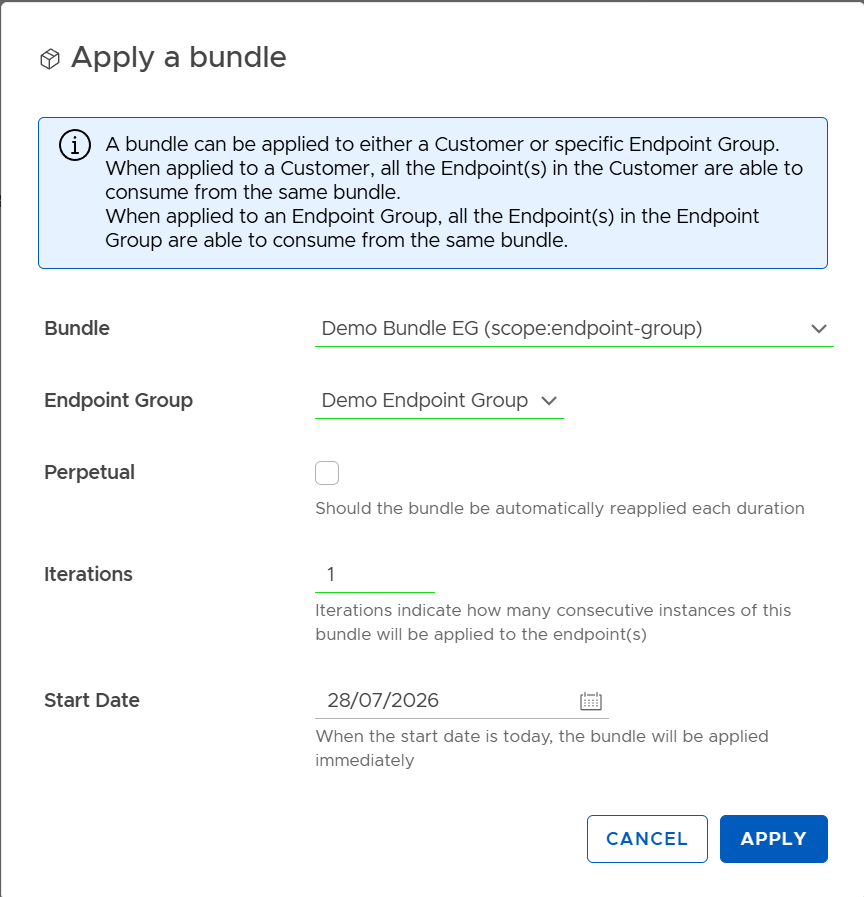
| Field | Description |
|---|---|
| Bundle | Select the bundle to be assigned. Note that they are appended with the scope (customer or endpoint-group). If an endpoint group bundle is selected the "Endpoint Group" field will appear. |
| Endpoint Group | The Endpoint Group that will receive the bundle assignment. All endpoints within this group will share and consume from the same bundle allowance. This is hidden if a customer scoped bundle is selected. |
| Perpetual | Assignment-level override that enables automatic renewal of the bundle indefinitely until it is manually removed. When enabled, the Iterations value is ignored. |
| Iterations | Assignment-level override that specifies how many consecutive instances of the bundle will be applied. If not changed, the default value from the bundle definition is used. |
| Start Date | The date on which the bundle should become active. If today's date is selected, the bundle is applied immediately. A future or past date can be assigned also. |
Updated 2 months ago
Did this page help you?