
Endpoint Groups
Logical containers that apply network configuration to all the endpoints they hold
What is an Endpoint Group?
An Endpoint Group is where network configuration lives. Every endpoint placed into a group inherits that group's complete set of policies:
- VSlice — the isolated network environment
- Routing Policy — how and where traffic is directed
- Regional Policy — geography-based network rules
- Operator Policy (optional) — preferred or restricted mobile operators
- Event Map (optional) — which events are generated for this group
- Session Inactivity settings — how to handle idle sessions
Changing any of these in the group takes effect immediately for every endpoint inside it. This is a key operational advantage: you manage groups, not individual SIMs.
Vantiq Motors — Example
Vantiq Fleet operates refrigerated HGVs across the UK and continental Europe. Rather than configuring each of 12,000 SIMs individually, they maintain four Endpoint Groups:
vantiq-fleet-uk,vantiq-fleet-de,vantiq-fleet-fr, andvantiq-fleet-nl. Each group has the appropriate regional operator preferences and routes telematics data to Vantiq's private data centre via IPSec VPN. When a vehicle's usual UK route is extended to the Netherlands for a new contract, the ops team reassigns its endpoint tovantiq-fleet-nl— that's one action, applied in seconds.
Group-Based SIM Management
The group model means that all SIM management decisions are made at the group level. Before creating your first Endpoint Group, plan your group structure around your operational needs:
- By geography — one group per country or region, each with a different Operator Policy
- By traffic type — separate groups for high-bandwidth vs. low-bandwidth devices
- By lifecycle stage — a staging group for newly provisioned devices, a production group for commissioned ones
- By customer or division — one group per business unit, keeping usage and events separate
There is no limit on the number of Endpoint Groups. A single endpoint belongs to one Primary group (and optionally one or more Secondary groups — see below).
Primary and Secondary Endpoint Groups
Every Endpoint Group is either Primary or Secondary. This determines how the group's APN is set and whether it can exist independently.
Primary Endpoint Groups
A Primary group's APN is inherited from its VSlice. You cannot edit the APN at the group level — it is fixed by the VSlice configuration. This is the standard group type for single-APN deployments.
Every endpoint must belong to a Primary group before it can be assigned to any Secondary groups.
Secondary Endpoint Groups
A Secondary group has its own APN, set explicitly on the group. This APN must follow the pattern configured on the VSlice — for example, if the VSlice uses the *.flex pattern, the Secondary group's APN must end in .flex.
A Secondary group does nothing on its own. It must be associated to a Primary group before it takes effect. Once associated, endpoints in the Primary group gain access to the Secondary group's APN and routing configuration.
Secondary groups are the mechanism behind multi-APN support — enabling a single SIM to carry different types of traffic over different APNs simultaneously, each with its own routing behaviour.
A Secondary group is not a fallback. It is an additional APN configuration. Both the Primary and Secondary APNs are active simultaneously on the device. The device firmware decides which APN to use for each type of traffic.
→ For a full explanation with a step-by-step automotive example, see Multi-APN Support.
Idle Timer Configuration
Each Endpoint Group includes Session Inactivity settings that control what happens when an endpoint's data session goes idle:
| Field | Description |
|---|---|
| Session Inactivity Time (seconds) | How long an inactive session is tolerated before an action is triggered. Leave blank to disable. |
| Session Inactivity Action | Notify — generate an event but keep the session open. Notify and Terminate — generate an event and forcibly close the session. |
This is useful for:
- Cost control — closing stale sessions for devices that should not hold persistent connections
- Alerting — detecting devices that have stopped communicating when they should be active
- Resource management — releasing IP addresses from devices that are no longer in use
Vantiq Motors — Example
Vantiq Workshop's diagnostic tablets are used intermittently throughout the day. When a technician forgets to close a diagnostic session, the session stays open and consumes data unnecessarily. Vantiq sets Session Inactivity Time to 1800 seconds (30 minutes) with action Notify and Terminate on the
vantiq-workshopgroup. After 30 minutes of no data, the session is closed automatically and an event is generated so the ops team can track it.
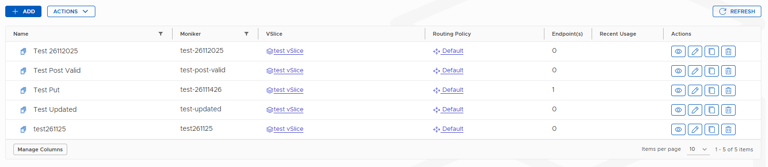
Where to Find Endpoint Groups
Navigate to Inventory → Endpoint Groups.
The list shows all groups on your account, with their type (Primary/Secondary), associated VSlice, and endpoint count.
From this screen you can:
- Create new Endpoint Groups
- Edit existing groups
- View a group's details, usage, events, and secondary group associations
- Delete groups that are no longer needed
Updated about 2 hours ago