
View an Endpoints IP Addresses
View the IP Addresses associated with this endpoint.
The IP Addresses tab displays the network addressing information assigned to an endpoint. This includes the IP addresses allocated to the endpoint across its associated APNs and Endpoint Groups.
Understanding how IP addressing works is essential for configuring routing, firewall rules, and connectivity to external systems.
Accessing IP Addresses
To view endpoint IP addresses:
- Navigate to Inventory → Endpoints
- Select an endpoint
- Open the IP Addresses tab
How IP Addressing Works
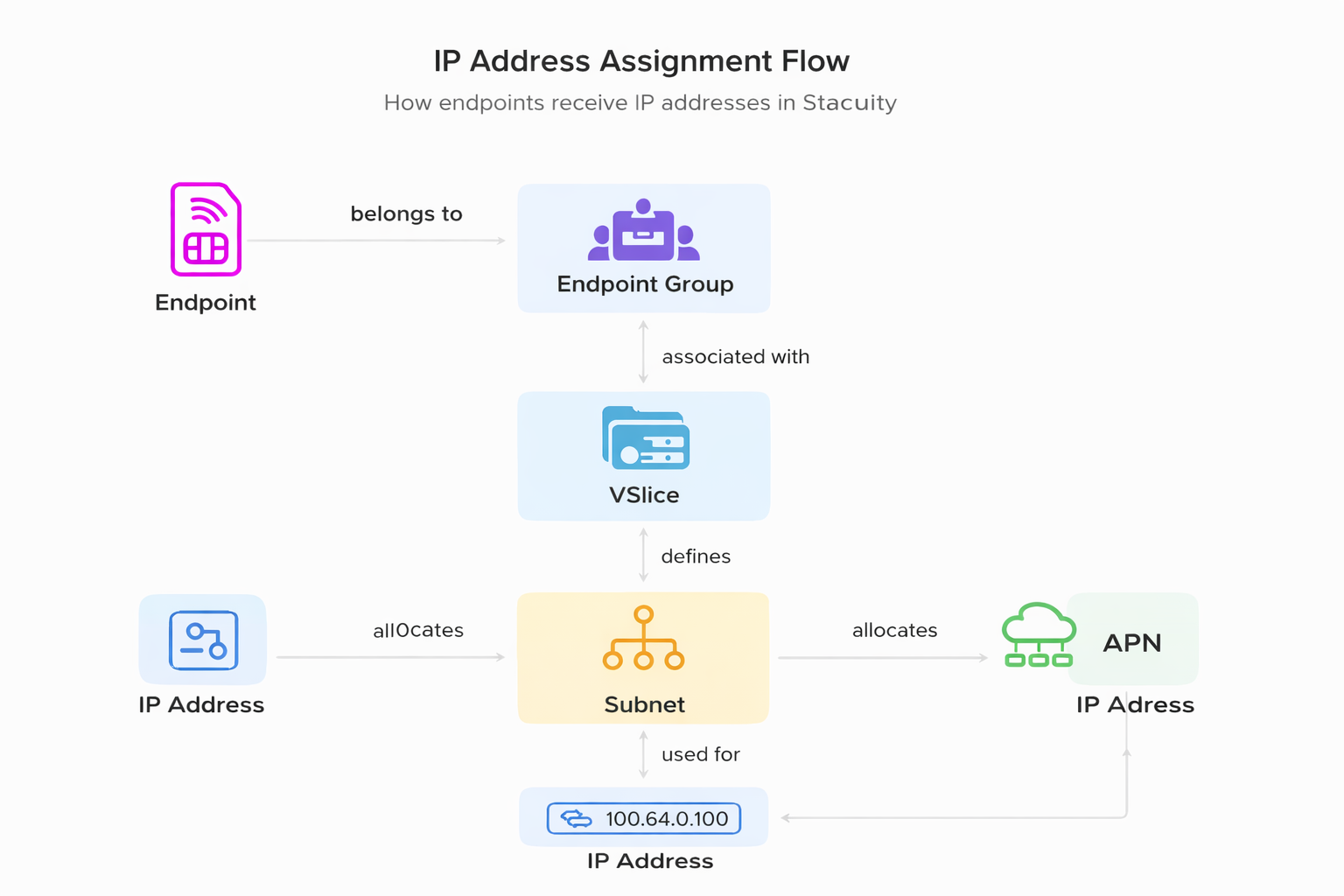
IP addresses in Stacuity are not assigned directly to an endpoint as a standalone object.
Instead, they are derived from the endpoint’s configuration:
- An endpoint belongs to an Endpoint Group
- The Endpoint Group is associated with a VSlice
- The VSlice defines the available subnet(s)
- The VSlice defines the APN
- When the endpoint establishes a data session, an IP address is assigned from the relevant subnet
IP addresses are therefore a result of group membership and active network sessions, not static endpoint configuration alone.
IP Address Allocation
An endpoint is assigned an IP address only when it establishes a data session.
- If the endpoint is Active and transmitting data, an IP address will be visible
- If the endpoint is Idle or Detached, no active IP address may be present
Single-APN vs Multi-APN
Single-APN
In a standard configuration:
- The endpoint belongs to a single (Primary) Endpoint Group
- One APN is applied
- One IP address is assigned per session
Multi-APN
In multi-APN deployments:
The endpoint belongs to:
- One Primary Endpoint Group
- One or more Secondary Endpoint Groups
Each group provides:
- Its own APN
- Its own IP address
The device selects which APN to use for each traffic type.
This allows multiple independent traffic flows from a single SIM or eSIM.
IP Address Table
The IP Addresses tab displays:
| Column | Description |
|---|---|
| Type | Indicates whether the IP is from the Primary or a Secondary Endpoint Group |
| VSlice | The VSlice the endpoint is associated with |
| PDN Type | The IP protocol type (e.g. IPv4) |
| Endpoint Group | The group providing the configuration |
| Subnets (v4/v6) | The subnet from which the IP is allocated |
| APN | The APN associated with this configuration |
| IPv4 / IPv6 | The assigned IP address (if a session is active) |
Static vs Dynamic IP Assignment
IP allocation is controlled at the endpoint level, within the subnet defined by the VSlice.
Static IP
- A fixed IP address is assigned to the endpoint
- The same IP is retained across sessions
Used for:
- VPN integrations
- Firewall allow lists
- Remote access
Dynamic IP
- IP is allocated from the available subnet pool when a session is established
- May change between sessions
Used for:
- Large-scale deployments
- Non-persistent connectivity
IPv4 and IPv6
- IPv4 is the standard addressing model used in most deployments
- IPv6 may be available depending on configuration
Troubleshooting IP Issues
If an endpoint does not have an IP address or cannot connect:
- Confirm the endpoint is Active and has an active session
- Verify the Endpoint Group configuration
- Check the VSlice subnet configuration
- Review the Events tab for session or network issues
- Use Packet Capture or Signalling Traces for deeper analysis
Endpoint → Network Assignment Flow
Updated 14 minutes ago